Closes your browsers properly
Each window is asked to close gracefully first, so the browser records a clean shutdown and won't offer to restore your tabs. Anything left running is then terminated.
 AdKilla
Free for Windows
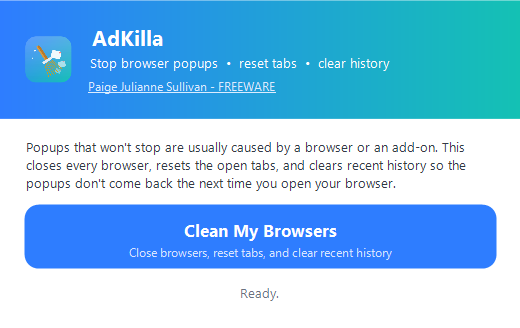
AdKilla closes every open browser, resets the tabs that keep reopening, and clears recent history — so the pop-up storm doesn't come back when you reopen Chrome. Your bookmarks and saved passwords are never touched.
Works with
Most “cleaners” ask you twenty questions. AdKilla asks one: are you sure?
Each window is asked to close gracefully first, so the browser records a clean shutdown and won't offer to restore your tabs. Anything left running is then terminated.
The session-restore state is removed, so your browser reopens with a clean slate instead of resurrecting the pop-ups and pop-unders you just closed.
The history database is cleared on Chromium browsers, so autocomplete stops suggesting the sites that started the mess.
Bookmarks and saved passwords are always preserved. Firefox keeps its history too, because it stores history and bookmarks in the same file.
The window, fonts, and icon read your display scaling and size themselves to match — no blurry upscaling on high-DPI monitors.
The bundled command-line tool audits your installed extensions and flags side-loaded ones — the usual source of endless popups.
The installer puts AdKilla in your user folder and adds a Start Menu shortcut. No admin rights required.
Confirm once. A single status line tells you when it's working and when it's finished — that's the whole interface.
It starts fresh: no restored tabs, no popup cascade, bookmarks and logins right where you left them.
The same download includes adkilla.exe, a command-line version that
prints every file it touches — scriptable, and safe to try with --dry-run.
C:\> adkilla --help
adkilla [options]

  --audit       List installed browser extensions (read-only, no changes).
  --dry-run     Show what would be done without changing anything.
  --tabs-only   Reset open tabs only; keep browsing history.
  --force       Terminate browsers immediately (skip graceful close).
  --yes, -y     Do not prompt for confirmation.
  --help, -h    Show this help.
AdKilla clears the mess popups leave behind. If they come back after a reboot,
the machine almost certainly has adware or a malicious browser extension.
Run adkilla --audit to spot it, remove anything you don't recognise
from your browser's extensions page (chrome://extensions,
edge://extensions, or about:addons in Firefox), and run a
reputable anti-malware scan.
No. AdKilla never touches bookmark or password storage. It removes session-restore state and, on Chromium browsers, the history database — nothing else.
No. The installer is per-user and goes into %LOCALAPPDATA%\Programs\AdKilla, so there's no UAC prompt. It registers a normal uninstaller in Apps & features.
Firefox stores history and bookmarks in the same database, so AdKilla only resets its open tabs and leaves history alone. Deleting your bookmarks to close a popup would be a bad trade.
Yes — freeware, by Paige Julianne Sullivan. No account, no subscription, no telemetry, no bundled extras.
64-bit Windows 10 and Windows 11.
Yes. The GUI (adkilla-gui.exe) and the command-line tool (adkilla.exe) are self-contained executables — the installer just adds shortcuts and an uninstall entry.
Free · Windows 10 & 11 · Version 1.0.0